Getting Started
What is LabKey
LabKey is a research data management platform designed to enhance research efficiency for scientists. It enables effective data integration, collaboration, and workflow management, allowing teams to store, organize, and share research data securely. The LabKey service at University of Basel is the professional version and includes a sample and freezer management module.
Who is it for
LabKey is designed for researchers looking to structure and centralize their data. It serves as an effective alternative to Excel, providing a reliable single source of truth for reference data, especially in collaborative research environments.
How to access LabKey
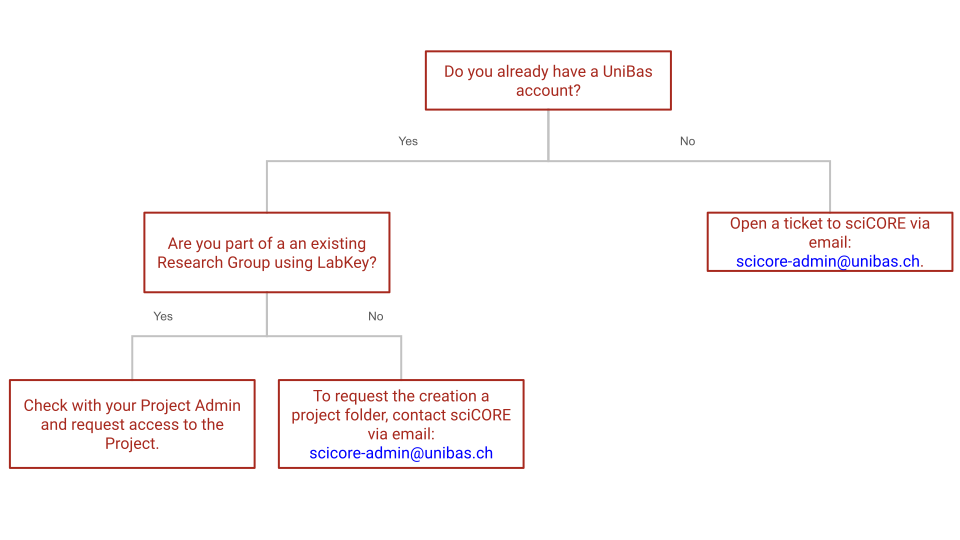
Once a UniBas account is acquired, LabKey is accessible from the University of Basel network, including via VPN. sciCORE provides three LabKey instances:
- sciCORE DEV LabKey server— A testing environment for exploring and validating configurations before migrating data.
- sciCORE Main LabKey server— The primary production server for research data.
- sciCORE Collab LabKey server— Designed for collaborations with users who do not have a UniBas email.
2-Factor Authentication
To ensure the security of research data, sciCORE LabKey enforces mandatory Two-Factor Authentication (2FA) for all users. This security layer requires a time-based code from an authenticator app in addition to your standard login credentials.
First-Time Login & Setup
You do not need to enable 2FA manually; the system will automatically prompt you to enroll during your first login.
- Prepare your device: Ensure you have an authenticator app installed on your smartphone (e.g., Microsoft Authenticator, or Google Authenticator.)
- Initial Setup: Upon your first login, LabKey will display a QR Code and a “Secret Key”.
- Link your account: Scan this QR code using your authenticator app to generate a 6-digit security code. Please also consider copying and saving the Secret Key for future reference
- Complete Enrollment: Enter the 6-digit code into the LabKey prompt to finalize your access.
For visual examples of the setup screen and the login process, please refer to the official documentation:
Important: API & Remote Access
Because 2FA is mandatory, standard password authentication will not work for remote data access (e.g., connecting via R, Python, or HTTP).
- API Keys: You must generate and use an API Key for all script-based access.
- Instructions: Follow the guide on Generating and Using API Keys to maintain access to your data through external tools.
Support & Recovery
- Device Issues: If you lose your mobile device or need to reset your 2FA registration (e.g., when switching to a new phone), please contact sciCORE Administration.
- Lab Access (Desktop 2FA): If you cannot use a mobile phone while in the lab and need to set up 2FA on a desktop computer instead, please refer to our FAQs for instructions on using desktop-based authenticator tools.
https://docs.scicore.unibas.ch/LabKey/faqs/#general
Understanding LabKey Folder Structure
LabKey organizes data in a hierarchy of folders, which helps you structure your research projects clearly:
- Site (Home Folder): The top-level container of the LabKey environment.
- Projects: A Project corresponds to a team or an area of work and can contain any number of “folders and subfolders” underneath to present each collaborating team with precisely the subset of LabKey modules needed.
- Subfolders: Nested folders within projects to further organize tools, data, and workflows.
Additional information
Detailed information can be found in the LabKey documentation Projects and Folders
Data Management
Data Storage Guidelines
LabKey is not intended for storing large raw data files. Users should avoid uploading files larger than a few megabytes (MB).
Info
sciCORE performs regular backups of the entire LabKey system, retaining them for three months for disaster recovery purposes.
Tip
It is recommended for the users to make periodic safety copies of the data contained in the LabKey environment. sciCORE can provide advice on the implementation of such a backup strategy.
Handling Sensitive Data
Sensitive data can be stored in LabKey; however, it is strongly recommended to anonymize or pseudonymize sensitive information before uploading. This ensures compliance with data protection regulations and minimizes the risk of unintended data exposure. Please note that the responsibility for assessing and accepting this risk lies with the Principal Investigator (PI) of the group.
Additional information
For comprehensive guidelines on handling personal and sensitive data, please refer to the University of Basel Data Protection Guidelines
sciCORE LabKey Terms of Use
Version 1.0 — 9 June 2026
About sciCORE
sciCORE is the scientific computing center of the University of Basel. It operates the IT infrastructure, software, and services that support active scientific research at the University of Basel and its partner institutions.
About LabKey
LabKey is a research data management platform that helps research groups structure, integrate, and share their data. The LabKey service at sciCORE includes the professional version with the sample and storage management module. It offers an effective alternative to spreadsheets for maintaining reference data within collaborations, and provides a single source of truth for research datasets.
LabKey instances are hosted on University of Basel infrastructure. Content stored in the service remains within the University and is backed up regularly by sciCORE for disaster recovery purposes. Login is via the University LDAP directory using institutional credentials.
The service is provided free of charge on a best-effort basis, with support during University of Basel office hours. It is designed for 24/7 availability, though occasional maintenance and interruptions may occur. Use of the service is subject to the sciCORE LabKey Terms of Use and to the “Regulation on the acceptable use of university IT resources” of the University of Basel.
What users can do
- Organise research data within LabKey Projects, which typically correspond to a research group.
- Track samples and storage inventory using the sample management module.
- Collaborate within a research group through role-based access control: each LabKey Project has one or more Project Admins responsible for adding members and managing permissions.
- Import and export datasets in common tabular formats.
- Generate their own API keys for programmatic access to LabKey (Note: For security reasons, API keys expire one year after creation and must be regenerated by the user).
- Work with pseudonymised personal data including health-related data, provided that identification keys are securely kept outside sciCORE by a party with no direct access to the data.
What users must not do
- Use the service for purposes other than the research for which access was granted.
- Store directly identifiable sensitive personal data on the service.
- Store large raw data files, images, personal documents, or administrative and office files — these belong on the appropriate IT Services shares.
- Share login credentials or allow other people to use their account.
- Use the service for projects requiring formal regulatory certification (for example, GxP-regulated clinical trials).
Responsibility of the PI and Project Admins
Each LabKey Project is associated with a Principal Investigator (PI) – typically the head of a research group – and is named after the PI. The PI can be a Project Admin themselves and can also assign other lab members as Project Admins of the LabKey Project to handle day-to-day administration.
The PI is responsible for:
- What data is uploaded to the LabKey Project, including ensuring that the data is appropriate for the service and complies with these terms, ethics approvals, and applicable law.
Project Admins are responsible for:
- Adding new group members to the LabKey Project and granting them the appropriate permissions.
- Removing access from members who no longer need it, for example when someone leaves the group or completes their contribution to the project, and asking sciCORE to deactivate the corresponding user account.
Acknowledging sciCORE
Please refer to the sciCORE website for guidelines on how to properly acknowledge sciCORE when presenting your results:
https://scicore.unibas.ch/using-scicore/acknowledging-scicore/